


- No tool does it all. Effective SEO combines Google data, a suite for market and competitor insights, and specialist tools.
- Google Search Console and Google Analytics 4 are the foundation, because they are the only source of first-party data on your own website.
- The market is consolidating: Semrush acquired Ryte in July 2024, and Adobe acquired Semrush in April 2026.
- According to Google, AI search does not require new tools, just good SEO. Search Console reports AI feature performance in a dedicated report.
SEO tools help you improve a website continuously and earn more search traffic over time. But the choice is huge, and many tools overlap. Pay for too many licenses, and you end up with more data, not more decisions.
For our own SEO work, we tested and assessed the 25 tools we consider most important. We group them by job: Google data, all-in-one suites, crawlers, keyword and content tools, specialist tools and WordPress plugins.
For each tool, we cover strengths, limitations and our verdict. We deliberately leave out pricing, because vendors change their plans often; check current pricing directly with each vendor.
The best SEO tools for everyday SEO work
| No. | Tool | Focus | Best for |
|---|---|---|---|
| 1 | Google Search Console | Performance, indexing, technical warnings | Every website |
| 2 | Google Analytics 4 | Visitor behavior and conversions | Every website |
| 3 | Google Keyword Planner | Search volume and cost per click | Keyword validation, online stores |
| 4 | Google Trends | Seasonality and trends | Topic planning |
| 5 | Semrush | All-in-one for SEO, content and ads | Marketing teams, agencies |
| 6 | Ahrefs | Backlinks and keyword data | Link building, analysis |
| 7 | Sistrix | Visibility index in the DACH region | Competitor analysis |
| 8 | SE Ranking | All-in-one with flexible plans | Agencies |
| 9 | Moz Pro | Suite with Domain Authority | Beginners, US projects |
| 10 | Seobility | On-page audit and rank tracking | Smaller teams |
| 11 | Ubersuggest | Simple starter suite | Beginners |
| 12 | Screaming Frog SEO Spider | Technical desktop crawler | Technical audits |
| 13 | Sitebulb | Crawler with clear, actionable hints | Consulting, reporting |
| 14 | Ryte | Cloud crawler and quality assurance | Large websites |
| 15 | Lumar | Technical SEO for very large websites | Platforms with many URLs |
| 16 | Mangools (KWFinder) | Keyword research | Content teams, niche sites |
| 17 | Surfer SEO | Content briefs and copy optimization | Editorial teams |
| 18 | AnswerThePublic | User questions | Topic discovery |
| 19 | BuzzSumo | Content, mentions, digital PR | PR and link building |
| 20 | SpyFu | Competitors in SEO and ads | Competitor analysis |
| 21 | Majestic | Link profiles and Trust Flow | Link analysis |
| 22 | Wincher | Rank tracking | Add-on to crawlers |
| 23 | Rank Math | WordPress plugin | WordPress websites |
| 24 | Yoast SEO | WordPress plugin | WordPress websites |
| 25 | UnitedAds Tools | Lean tools for specific tasks | Day-to-day optimization |
Google's own tools provide the data you can base your decisions on
Third-party tools estimate and extrapolate. Only Google provides first-party data on how your website appears in search and what visitors do next. Google offers these four tools free of charge.
1. Google Search Console
Search Console is the direct line between your website and Google's index. It shows clicks, impressions and rankings by query, page, country and device. The Indexing section explains why specific URLs are not indexed, for example because of 404 errors, server issues or intentional exclusions.
That is the foundation of technical SEO.
It has become just as important for AI search: according to Google, a dedicated report shows how your content performs in Google Search's generative AI features and in Discover.
Strengths:
- Real click and impression data straight from Google, with no estimation error.
- The URL inspection tool lets you submit new or updated pages for indexing.
- The only source of official notices on manual actions and security issues.
- Core Web Vitals from real user data.
Limitations:
- Data arrives with a delay, so you cannot react in real time.
- The interface only exports a subset of rows; large websites need the API.
- No data on competitors.
- Some queries are withheld for privacy reasons.
Start with Search Console: it shows which search queries your website appears for, gets clicks for or has problems with. We never start an analysis without checking its data first. It is the only tool that shows how Google actually interprets your site and whether technical measures such as structured data or load time optimizations have taken effect.
2. Google Analytics 4
Google Analytics 4 uses an event-based model: every page view, click, scroll or video start is an event. Search Console shows how visitors find your site; GA4 shows what they do once they arrive. For SEO, the traffic acquisition report matters most, because it isolates organic visitors and their behavior.
That is how GA4 connects visibility to business results. A higher ranking is only worth something if it drives inquiries and sales that contribute to profit.
Strengths:
- Event-based tracking accurately reflects behavior on modern, interactive websites.
- You can measure website and app together.
- Raw data export to BigQuery is available even in the free version.
- Explorations show, for example, how visitors to different blog posts differ.
Limitations:
- The interface has a learning curve, and many reports need to be set up first.
- At high traffic volumes, some reports rely on sampling.
- In the EEA, you need a proper consent solution; server-side tagging makes the data more reliable.
Our verdict: GA4 is how you prove SEO is working. If you own a budget, you cannot do without a properly configured analytics setup. Our rule: measure first, then optimize.
3. Google Keyword Planner
Keyword Planner is part of Google Ads and was built for ad planning. For SEO, it is a key source of search volume, ad competition and estimated cost per click. You can upload keyword lists or generate new ideas from a URL.
Strengths:
- Data straight from Google; many keyword tools are built on it.
- Forecasts by season and region.
- Cost per click reveals a keyword's commercial value.
Limitations:
- Without active ad spend, Keyword Planner often shows only broad ranges.
- Close variants are grouped together, and informational long-tail keywords are often missing.
- The interface is built for buying ads.
Our verdict: Essential for validation. If a third-party tool shows high search volume but Keyword Planner shows little demand, be careful. It is too coarse for editorial planning, but a key data source for commercial pages and online stores.
4. Google Trends
Google Trends shows the popularity of search terms over time as a relative index, not an absolute number. You can see whether interest in a topic is growing or fading, compare terms and spot regional differences. Breakout related queries show up there long before they appear in keyword databases.
Strengths:
- Highly current data on events and trends.
- Shows exactly when topics become seasonally relevant.
- Compares brand demand over time.
Limitations:
- No absolute search volumes.
- Few keyword suggestions and often no data for low-volume terms.
Our verdict: A big-picture tool. If you are planning evergreen content, check here whether the topic has a future. It also helps with wording: Google Trends shows by region whether your customers search for “Sonnabend” or “Samstag” (two German words for Saturday).
All-in-one suites show you the market and your competitors
Google's tools only see your own website. Suites show you the market: which keywords competitors own, where their links come from and where the gaps are. The data is extrapolated, but indispensable for benchmarking.
5. Semrush
Semrush is an online visibility platform that combines technical SEO analysis, content marketing, social media and ad intelligence. At its core is a large database of keywords and backlinks. Domain Overview gives you a snapshot of any domain in seconds, and the Keyword Magic Tool clusters terms by meaning and search intent.
Adobe acquired Semrush in April 2026, citing visibility in traditional search, generative AI answers and AI agents as the explicit rationale.
Strengths:
- Replaces several standalone tools for SEO, content and ads.
- Competitor ad data helps you sanity-check keyword strategies.
- Polished, presentation-ready reports.
- Technical audit with prioritized recommendations.
Limitations:
- Extra seats and add-ons drive up costs quickly.
- The sheer number of features can overwhelm beginners.
- Historical data is limited on lower-tier plans.
Our verdict: Semrush is the most versatile tool for teams that run SEO, content and ads together. You spot a competitor's keyword gap, turn it into a brief, track the ranking and check whether ads on that term would pay off, all in one place. We are keeping an eye on where the platform goes under Adobe.
6. Ahrefs
Ahrefs has grown from a backlink tool into a full SEO suite and is especially valued for its data quality. Its crawler is one of the most active on the web, which keeps link and keyword data fresh. Site Explorer analyzes any domain's organic traffic and link profile, while Content Explorer shows which content across the web attracts the most links.
Strengths:
- Excellent backlink data for link analysis and link building.
- Keywords Explorer shows how many searches actually result in clicks.
- Clear, fast interface.
- Link Intersect finds link gaps against several competitors at once.
Limitations:
- Usage-based pricing makes costs hard to predict.
- Reporting is less flexible than in Semrush.
- Site Audit does not go as deep as dedicated crawlers.
Our verdict: Ahrefs is the go-to tool for anyone whose strategy depends on link building and authority. If you want to understand why a page ranks on the strength of its authority, use Ahrefs. It is less a marketing all-rounder than a precision instrument for analysis.
7. Sistrix
Sistrix is an institution in German-speaking markets. It pioneered the visibility index, a metric that condenses a domain's weighted presence in Google results into a single number. Unlike traffic estimates, it tracks search market share over many years. The toolbox is modular.
Strengths:
- In Germany, the visibility index is the standard for quick comparisons.
- Captures local search behavior in the DACH region (Germany, Austria, Switzerland) well.
- Google updates are flagged in the trend charts, which speeds up diagnosing losses.
- Modules can be purchased individually.
Limitations:
- Less coverage for international projects than Ahrefs or Semrush.
- Backlink data does not match dedicated link crawlers.
- Tight query limits on lower-tier plans.
Our verdict: If you do SEO in the German market, Sistrix is hard to ignore. Its strength is strategic analysis: who is gaining market share, and which competitor directory is performing? The charts work well for explaining trends to leadership. It is our tool of choice for reconstructing losses after Google updates.
8. SE Ranking
SE Ranking is a full-featured platform for rank tracking, site audits, backlink monitoring, keyword research and competitor analysis. You choose how often rankings update, which determines the price. It also offers white-label features and a task list that guides teams through optimization.
Strengths:
- Flexible pricing based on update frequency.
- Strong features for client reports and dashboards.
- Modern, clean interface.
Limitations:
- Keyword and backlink databases are thinner than Semrush and Ahrefs in niche areas.
- Some modules lack the depth of specialist tools.
- Full API access only on higher-tier plans.
Our verdict: SE Ranking offers excellent value for its feature set. For agencies that need most of what Semrush does but want predictable costs for client access, it is a serious alternative.
9. Moz Pro
Moz is one of the pioneers of SEO software. Moz Pro is known for its Domain Authority and Page Authority metrics, used worldwide as a measure of link strength. The suite covers keyword research, technical crawling and link analysis, with a strong emphasis on education.
Strengths:
- Domain Authority is a widely used benchmark in reporting.
- Keyword Explorer delivers good topic ideas and realistic difficulty scores.
- Intuitive and beginner-friendly.
Limitations:
- Databases outside the US are often smaller.
- Interface and crawler feel dated next to the big suites.
Our verdict: Moz Pro suits teams that want a gentle learning curve. Domain Authority remains a widely used metric, even though Google does not use it. For the German market, we usually reach for Sistrix or Ahrefs.
10. Seobility
Seobility is a German all-in-one solution that combines continuous site crawling with rank tracking, backlink analysis and a WDF*IDF content tool. Its on-page analysis of metadata, structure, internal linking and load times is particularly strong. The dashboard prioritizes tasks by urgency.
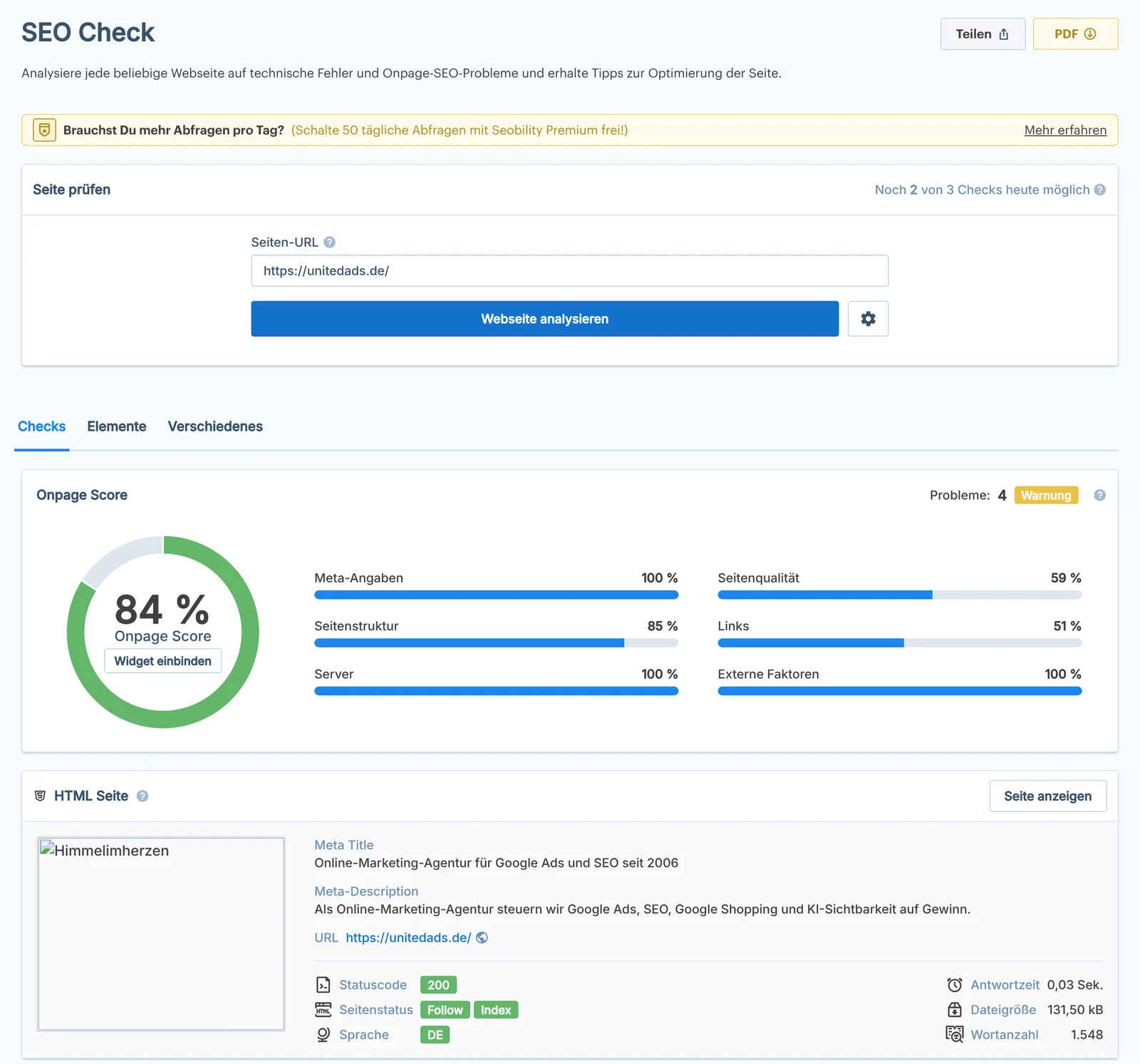
Screenshot: free Seobility SEO check for unitedads.de, taken on November 7, 2026.
Strengths:
- A full SEO suite at a reasonable cost.
- Explains issues clearly and prioritizes tasks.
- Reliable on-page audit.
- White-label reports in the agency plan.
Limitations:
- Far smaller backlink database than the market leaders.
- Keyword tracking limits are reached quickly.
- Limited for highly complex technical analysis such as log files or JavaScript rendering.
Our verdict: Seobility is the smartest choice for teams that want a technically clean site without a large software budget. If your focus is on-page optimization and rank monitoring, you get a very well-rounded package.
11. Ubersuggest
Ubersuggest started as a basic scraper for Google autocomplete suggestions and was developed by Neil Patel into a simple all-in-one suite: keyword research, competitor analysis, site audit and backlink data. The Top SEO Pages report quickly shows which content is working for competitors.
Strengths:
- Low barrier to entry.
- Very simple, walks beginners through the basics.
- Good inspiration for content ideas.
Limitations:
- Keyword and backlink data less accurate than the big tools.
- Audits and filters are too shallow for professionals.
Our verdict: Ubersuggest is a good tool for learning SEO and is enough for many small websites. If you manage larger budgets, its data accuracy means you should not rely on it alone.
Crawlers find the technical errors that hold back your rankings
Crawlers scan your website the way a search engine does and uncover anything that gets in Google's way during crawling and indexing: broken links, redirect chains, duplicate content, missing metadata. They differ mainly in whether they run locally or in the cloud and how they present the results.
12. Screaming Frog SEO Spider
Screaming Frog runs as a desktop application on Windows, macOS and Linux. It simulates a search engine crawl, renders JavaScript with a Chromium browser, checks status codes, extracts metadata and detects duplicate content. Through integrations with Google Analytics and Search Console, it also finds orphan pages with no internal links.
Strengths:
- Catches issues cloud crawlers miss, such as complex redirect chains.
- Annual license with no project limits.
- Extracts any data via XPath or regex, such as prices or authors.
- Traffic data per URL, right in the crawl.
Limitations:
- Large crawls eat up your machine's memory.
- No automatic history or ongoing monitoring.
- Spreadsheet-style interface with a learning curve.
Our verdict: Screaming Frog is the industry standard for technical SEO. Hardly any professional audit is done without it. For serious audits, the license often pays for itself with the first critical issue it uncovers.
13. Sitebulb
Sitebulb bridges the gap between technical data analysis and reporting people can understand. Where Screaming Frog gives you tables, Sitebulb interprets the data and visualizes it. Hundreds of prioritized hints explain why an issue matters for SEO. Sitebulb Cloud now also offers a version that takes the load off your local hardware.
Strengths:
- Clear, prioritized explanations, even for beginners.
- Charts that drop straight into presentations.
- Reliable JavaScript rendering for modern web apps.
Limitations:
- On very large websites, the desktop version can slow your machine down.
- The cloud version is considerably more expensive.
- Audit-only tool with no rank tracking or keyword research.
Our verdict: Sitebulb is ideal for consultants who need to explain their findings. Its visualizations save hours on reporting and help junior team members understand how issues connect. If clear presentation matters to you, Sitebulb is a better fit than Screaming Frog.
14. Ryte
Ryte, formerly OnPage.org, runs entirely in the cloud and continuously monitors large websites. Beyond classic SEO factors, it checks Core Web Vitals, server availability and compliance issues. Historical crawl data shows how structure and error rates change over months. Semrush acquired Ryte in July 2024.
Strengths:
- Scales to projects with huge numbers of URLs, no local hardware needed.
- Interactive crawl maps make site structures easy for leadership to grasp.
- Strong content optimization module with WDF*IDF analysis.
Limitations:
- Often overkill for small websites.
- Weaker on backlink analysis than specialist tools.
- Crawl volume limits even on paid plans.
Our verdict: Ryte suits in-house teams running large websites and agencies that take quality assurance seriously. During relaunches, it is a reliable watchdog that flags errors before they cost you traffic in production.
15. Lumar
Lumar, formerly DeepCrawl, is a cloud platform for technical SEO on very large websites such as marketplaces, online stores with large catalogs and international publishers. It connects SEO data to data warehouses such as Snowflake or BigQuery and covers accessibility and site speed as well as SEO.
Strengths:
- Crawls huge numbers of URLs in parallel.
- Automated SEO tests in the development pipeline, before code goes live.
- Built-in log file analysis shows how Googlebot behaves on your server.
- Integrations with BI tools.
Limitations:
- Expensive; only justified for very large websites.
- Needs technical resources to set up and run.
Our verdict: Lumar is built for organizations where a small SEO error can cost a lot of revenue. Its strength is embedding SEO standards into IT development processes, so errors never go live in the first place. For smaller websites, it is overkill.
Keyword and content tools align your copy with real search questions
Good content starts with what your customers want to know. These tools help with research, topic discovery and distribution. They do not replace your own expertise, but they show you where it is needed.
16. Mangools (KWFinder)
Mangools is a suite of five specialized tools: KWFinder for keywords, SERPWatcher for rankings, LinkMiner for backlinks, SiteProfiler for domain metrics and SERPChecker for SERP analysis. KWFinder surfaces keywords with demand but little competition.
Strengths:
- Very intuitive interface.
- Good for low-competition long-tail keywords.
- Difficulty scores are often more realistic for smaller websites.
Limitations:
- Daily query limits on lower-tier plans.
- No full site audit; backlink data is less extensive than Ahrefs.
Our verdict: Mangools is for content teams that find Ahrefs or Semrush too much. For niche sites, KWFinder is often the only research tool they need.
17. Surfer SEO
Surfer SEO analyzes the top-ranking pages for a keyword and derives content guidelines from them: length, structure, terms and related topics. The Content Editor scores your draft in real time as you write. Surfer now also uses AI to generate and revise entire drafts.
Strengths:
- Data-driven briefs based on SERP analysis.
- Integration with Google Docs and WordPress.
- Consistent quality, even with rotating writers.
Limitations:
- Risk of writing unnatural copy just to push up the score.
- AI features often cost extra.
- On-page tool only, with no backlinks or technical audit.
Our verdict: Surfer is the standard for content briefs in many editorial teams. But it is an on-page optimization tool and replaces neither keyword research nor link building. A high score makes your copy comparable to what already ranks; what makes it better is your own data and experience. Used with editorial judgment, it is a powerful lever.
18. AnswerThePublic
AnswerThePublic uses Google autocomplete to surface every question and preposition users type around a topic. Results are shown as search clouds. Since its acquisition by NP Digital, it also includes search volumes.
Strengths:
- Excellent for topic discovery, blog posts and FAQ sections.
- Shows which problem users are trying to solve and the words they use to describe it.
Limitations:
- A research instrument, not a full SEO tool.
- The basic version offers few queries and no exact volumes.
Our verdict: Before we write an article, we check here whether it answers the questions users actually ask. It is more market research than SEO tooling, and that is exactly why it is valuable.
19. BuzzSumo
BuzzSumo is a content marketing and PR tool. It shows which content gets shared and linked the most across the web and social networks, and identifies journalists and opinion leaders covering a topic. It also monitors brand mentions, including unlinked ones.
Strengths:
- Shows what content works before you invest.
- Finds the right contacts for targeted digital PR.
- Monitors unlinked brand mentions.
Limitations:
- Built for professional teams, and priced accordingly.
- Social signals are not a direct ranking factor, so the SEO benefit is indirect.
Our verdict: Mentions in trade media strengthen your brand in search and in AI answers. BuzzSumo helps you earn those mentions deliberately instead of buying links. Anyone serious about content marketing will benefit.
Specialist tools round out your stack for competitors, links and rankings
Each of these three tools does one thing exceptionally well. They do not replace a suite, but they fill specific gaps.
20. SpyFu
SpyFu is all about competitors. Enter a domain, and you see which keywords it ranks for, how its rankings have trended and which Google ads it runs. SpyFu archives ad copy over years and shows how long each ad ran, a strong hint that it is profitable.
Strengths:
- Shows where competitors pay for keywords instead of ranking organically.
- Ad copy archive going back many years.
- Visualizes keyword overlaps between domains.
Limitations:
- Strongest in the US and UK; German data is often weaker.
- No technical audits.
Our verdict: SpyFu is an add-on, not a standalone SEO tool. If you want to understand how a competitor splits budget between SEO and ads, it lets you learn from their experience before you invest yourself.
21. Majestic
Majestic maps links and nothing else. It is known for its Trust Flow (quality) and Citation Flow (quantity) metrics, which also appear in other tools. Topical Trust Flow shows which topic areas a website has authority in. The data is split into a fresh index and a historic index.
Strengths:
- Trust Flow helps you assess link quality and spam risk.
- Large historical archive for analyzing old links and domain history.
- Robust API used by many other tools.
Limitations:
- No rank tracking or keyword research.
- Technical interface; interpreting the data takes experience.
Our verdict: Majestic is highly valuable for link building, domain acquisitions and penalty analysis. To check whether a domain is clean or inflated by spam, look at its Trust Flow. It is too specialized for day-to-day marketing, but a strong addition to a professional stack alongside Search Console and a suite.
22. Wincher
Wincher is a Swedish rank tracker that focuses on a single job: precise, daily tracking of keyword positions. You can group, tag and track keywords over years, and refresh rankings on demand.
Strengths:
- Lean, with clean and reliable tracking data.
- On-demand refresh lets you check the impact of a change immediately.
- WordPress plugin and email reports.
Limitations:
- No audit and no backlink data.
- Local tracking is less granular than in specialist tools.
Our verdict: A good add-on for crawlers such as Ryte or Screaming Frog that lack built-in rank tracking. When the question is “Did I move up?”, Wincher gives the clearest answer.
WordPress plugins handle the technical basics right in your CMS
On WordPress, a plugin is the best way to manage titles, descriptions, sitemaps and structured data. Two solutions dominate the market. For more on the basics, see our article on WordPress SEO.
23. Rank Math
Rank Math is modular, so you can switch off features you do not need. It gives optimization feedback right in the editor and includes a redirect manager, a 404 monitor, a structured data generator and Search Console and Analytics integration. Its Content AI feature supports copy optimization with AI.
Strengths:
- Many features, such as redirects and structured data, are included in the free version.
- Strong structured data generator.
- Pro version is affordable compared with other plugins.
Limitations:
- Self-promotion and upsell prompts inside the plugin.
- The many settings can trip up beginners.
Our verdict: Rank Math leads WordPress SEO plugins on the technical side and has forced competitors to catch up. For websites that rely heavily on rich results, it is the best choice. The Pro version often replaces several standalone plugins.
24. Yoast SEO
Yoast SEO is the best-known WordPress plugin and runs on a huge number of websites. It is known for its traffic-light system, which shows at a glance whether a text is optimized for search and readability. Behind the scenes, it handles canonical tags, XML sitemaps and metadata. The Premium version adds internal linking suggestions and a redirect manager.
Strengths:
- Very stable, with hardly any conflicts with themes or other plugins.
- Easy for anyone to use.
- Premium includes access to SEO courses.
Limitations:
- The free version is limited, for example with no redirect manager.
- Less extensive than Rank Math for structured data and AI features.
Our verdict: Yoast is the safe choice. For websites handed over to non-technical teams, it is often the better fit, because there is less to misconfigure than with Rank Math.
Our own tools speed up recurring tasks
25. UnitedAds Tools
At tools.unitedads.de, we offer our own tool collection, built from the day-to-day work of our SEO and performance teams. Instead of one big dashboard, you get lean tools for specific tasks.
They include helpers for optimizing snippets and building error-free structured data, plus calculators that translate SEO metrics into revenue forecasts. That turns an abstract ranking improvement into a number leadership can make decisions on.
Strengths:
- Built from real tasks our teams handle, and usable right in the browser.
- Calculators translate SEO potential into expected revenue.
Limitations:
- Built for specific tasks, not a substitute for a full suite.
Our verdict: These tools complement the big SEO suites for specific everyday optimization tasks.
AI search expands what your tools need to measure
AI Overviews, Google's AI Mode, ChatGPT and Perplexity raise a new question: is your company mentioned in the answers? In its guide to generative AI search, Google makes clear that optimizing for it is still SEO. For Google Search, you do not need special structured data, new file formats or an llms.txt.
For your tool stack, the fundamentals stay the same. What is new is the Search Console report showing how your content performs in Google's AI features. The big suites are developing their own metrics for AI answer visibility, and Adobe explicitly cited this when it acquired Semrush.
We also run our own spot checks on how often, and in what context, ChatGPT and Perplexity mention your brand. Learn more in our articles on generative engine optimization and SEO metrics in AI search.
Conclusion: your SEO stack is only as strong as the decisions you make with it
No tool does it all. Search success depends on the right combination, and on knowing which decision the data points to.
- The foundation: Google Search Console and Google Analytics 4 are non-negotiable.
- The all-rounder: Semrush offers the broadest package for SEO, content and market analysis.
- The specialists: Screaming Frog for technical SEO, Ahrefs for link building and Sistrix for the German market.
- For smaller budgets: Seobility and Rank Math make professional SEO possible at a reasonable cost.
Invest in understanding your data before you approve budget for more licenses. A tool is only as effective as the strategy behind it. If you want support choosing tools and interpreting the data, take a look at our SEO services.


